
Flagship Windows app · version 0.7.0 · €149 one-time
Make your PDFs pass an accessibility audit — and prove it.
Since 28 June 2025 the European Accessibility Act applies, and public bodies have long been bound by the Web Accessibility Directive. Both point to EN 301 549, which asks for accessible documents: a real tag structure, a document language, embedded fonts, a description for every picture and correct table headers.
- Windows 10/11 64-bit
- veraPDF 1.30.2 verified
- Version 0.7.0
- €149 one-time · 1 PC
Installer about 1.7 GB (the built-in AI model is included). Windows SmartScreen may warn on first run because the installer is not code-signed yet — click “More info → Run anyway”.
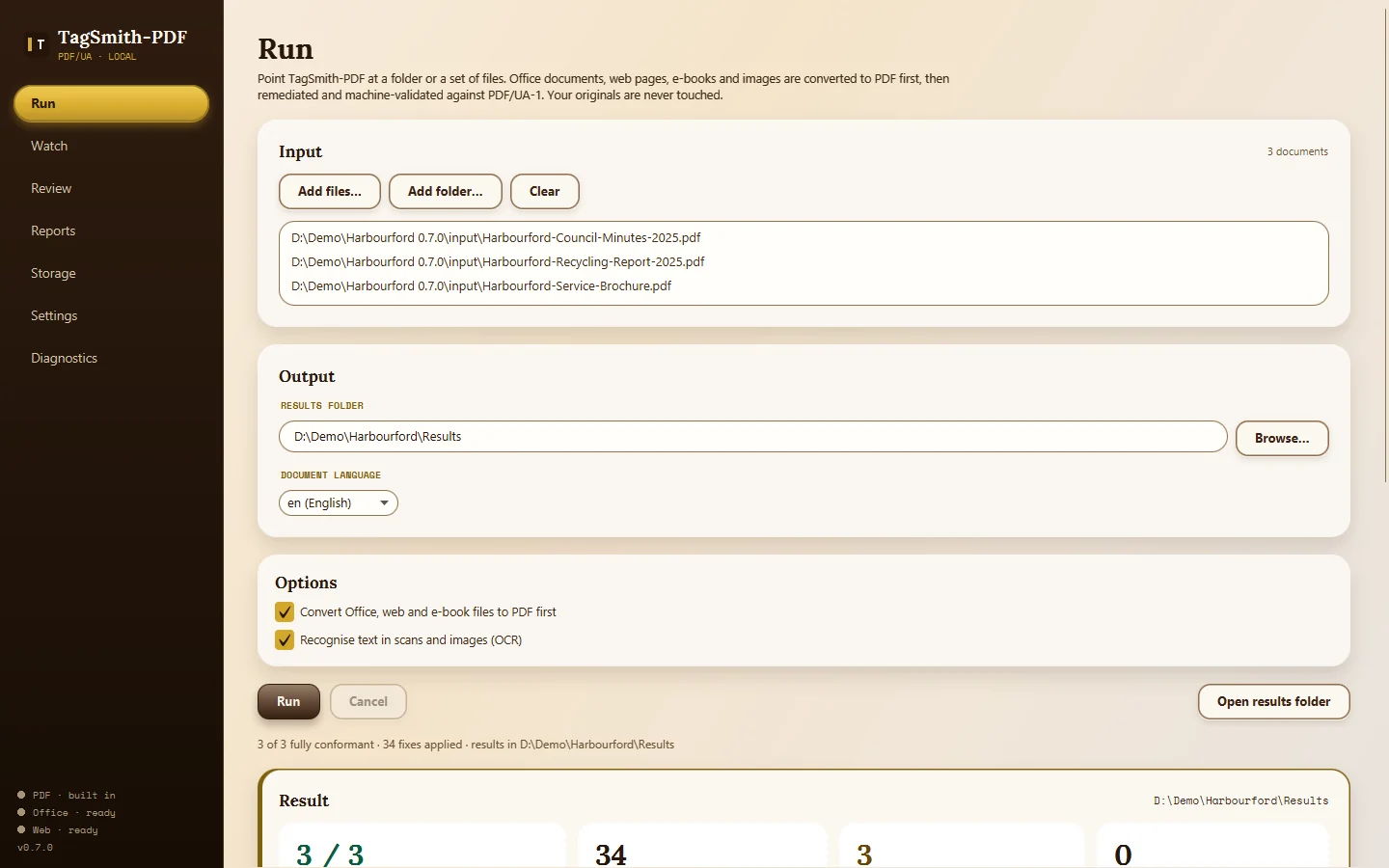
Most PDFs exported from Word or InDesign have none of that, and fixing them by hand takes hours per document. TagSmith-PDF does the mechanical work for whole folders at once, checks every result with veraPDF 1.30.2 (the reference PDF/UA validator) and hands you only the few items that genuinely need a person — with a built-in AI that drafts a description for every picture.
Measured on TagSmith-PDF 0.7.0, 12 October 2026: 97 real PDFs from EU institutions (31 of 31), Dutch national reports (40 of 40) and US tax forms (26 of 26), checked with veraPDF 1.30.2. Machine-verified and reproducible. 344 automated tests: 0 failures, 2 skipped.
Capabilities
What TagSmith-PDF does on your machine
PDF/UA-1 repair
Tags, language, metadata, headings, links, font maps and more (ISO 14289-1). Every fix is recorded against the rule it satisfies.
Checked with veraPDF 1.30.2
No “looks fine to me”: each document gets PASS or a list of what is still open.
Converts first
Word, Excel, PowerPoint, HTML, Markdown and EPUB become accessible PDFs. Scans and images are read with built-in OCR (English, Dutch, German, French, Spanish, Italian).
Built-in AI for alt text
A small vision model ships with the app and writes a description for every photo, chart, diagram and logo, in the document’s language. Each stays marked AI DRAFT until you accept or edit it. Nothing to install, nothing leaves your PC.
Tables and charts
Ruled tables are rebuilt from the page grid (headers marked, continued tables joined). Charts drawn as shapes are tagged as figures that need a description instead of being skipped.
Reports for your auditor
Before/after HTML report, an Accessibility Conformance Report in the VPAT® 2.5 section layout, audit.csv spreadsheets and an EU accessibility statement in English, Dutch or German — with your own name and logo.
- Hear what a screen reader hears. The preview lists the document in the order a blind reader gets it — headings with level, lists, tables, image descriptions — and flags what a listener would miss.
- Real document titles. A placeholder such as “untitled” or “Document1” is replaced with the document’s own headline.
- Bookmarks from headings for multi-page documents; your existing bookmarks are never replaced.
- Whole folder trees, watched folders and a command line. Drop files in, get accessible files out; earlier results inside the folder are skipped.
- Your language, everywhere. The whole app — buttons, messages, licence and AI status — in 12 languages including English, Dutch, German and French.
- Speed. About 10–13 seconds per picture on a desktop processor (measured on a Ryzen 7 5700G; slower laptops take longer), under half a second per picture with a graphics card (measured on an RTX 3090).
See it work
The shipping app, on a deliberately hard demo set
A 30-page Word report full of charts and tables, a spreadsheet, a scanned letter, an untagged brochure with form fields, 24 pages of council minutes, a web page and a recycling report with photos. The demo documents are invented (“Harbourford” is a fictional town); the screens are from the shipping app.
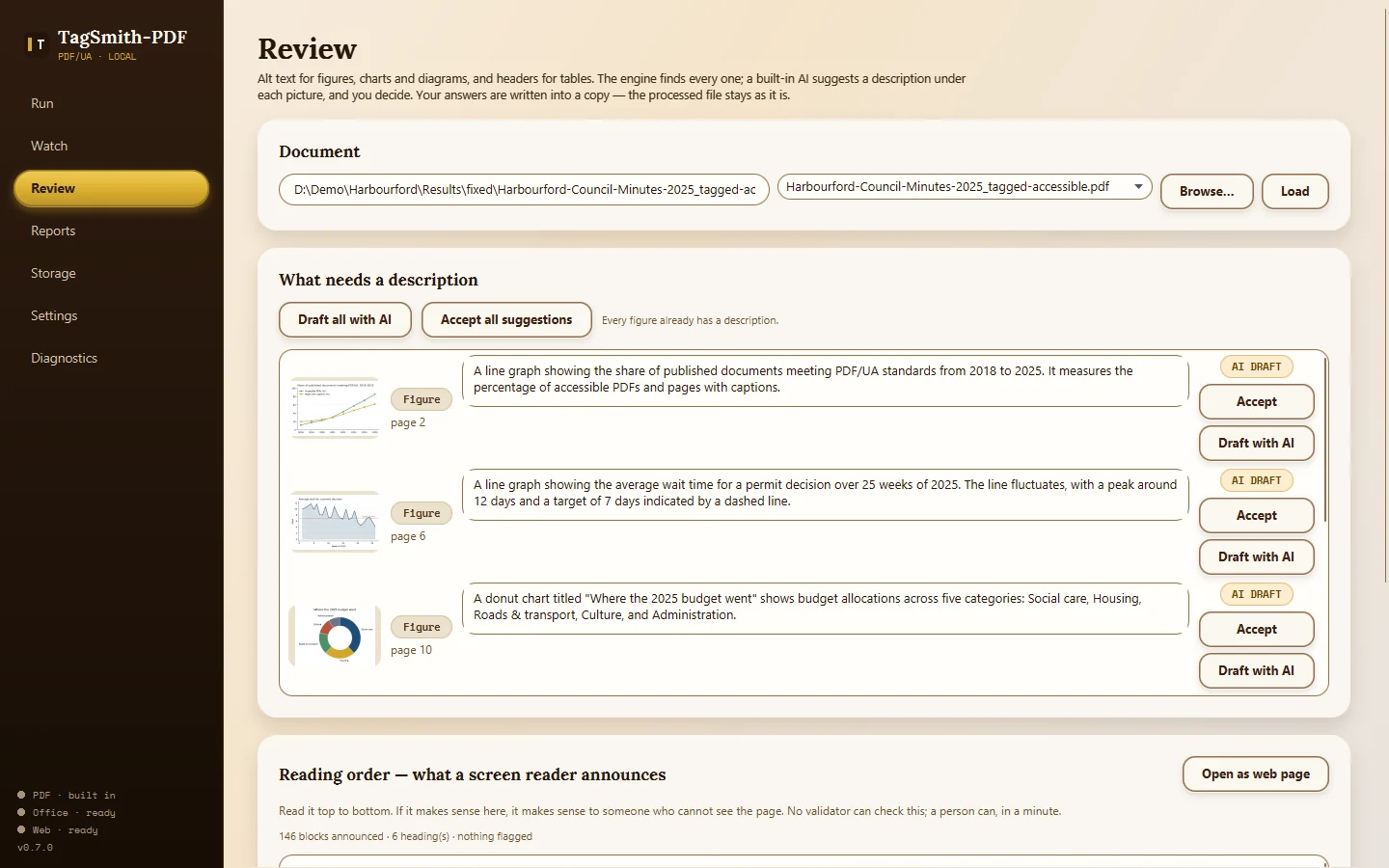
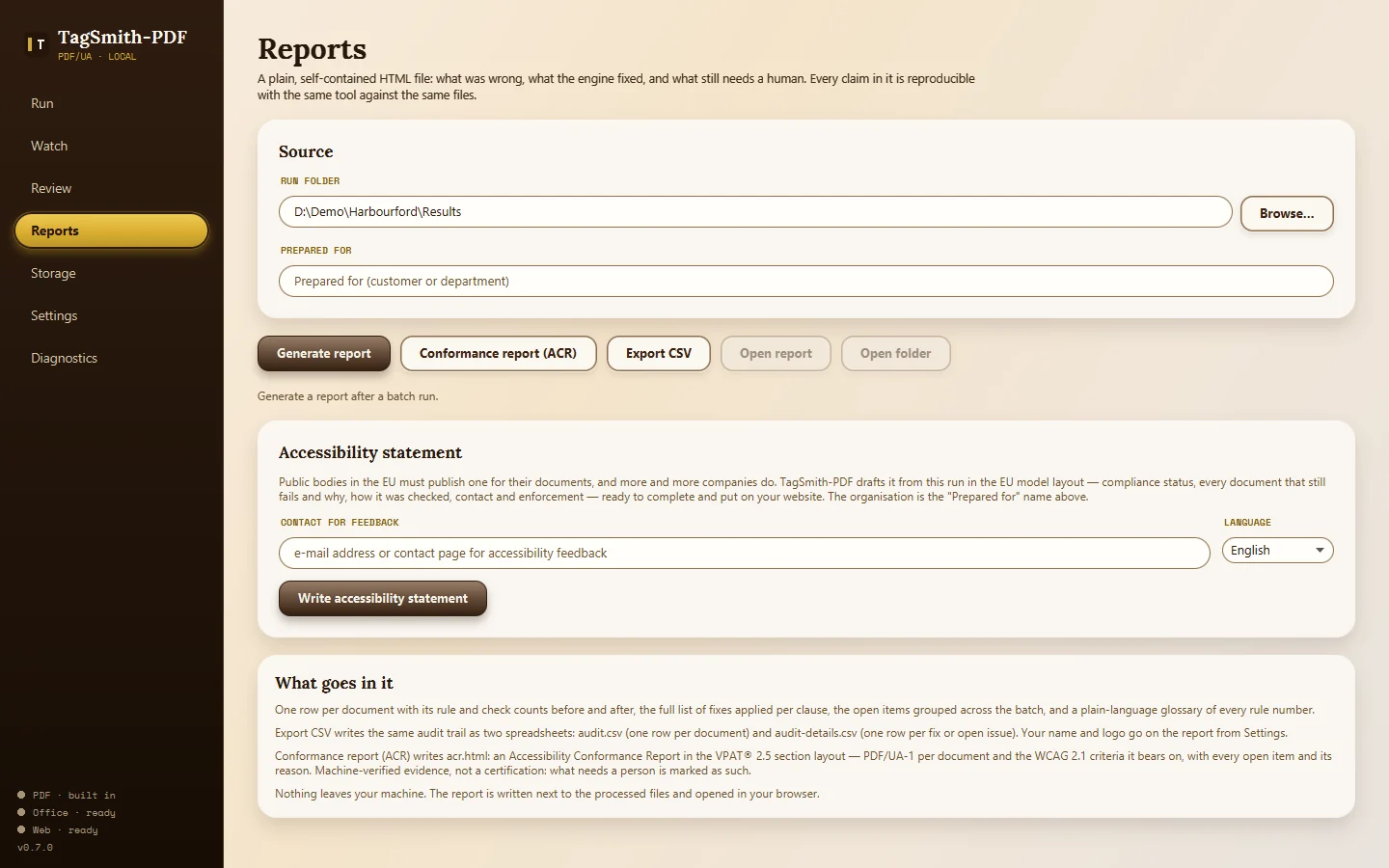
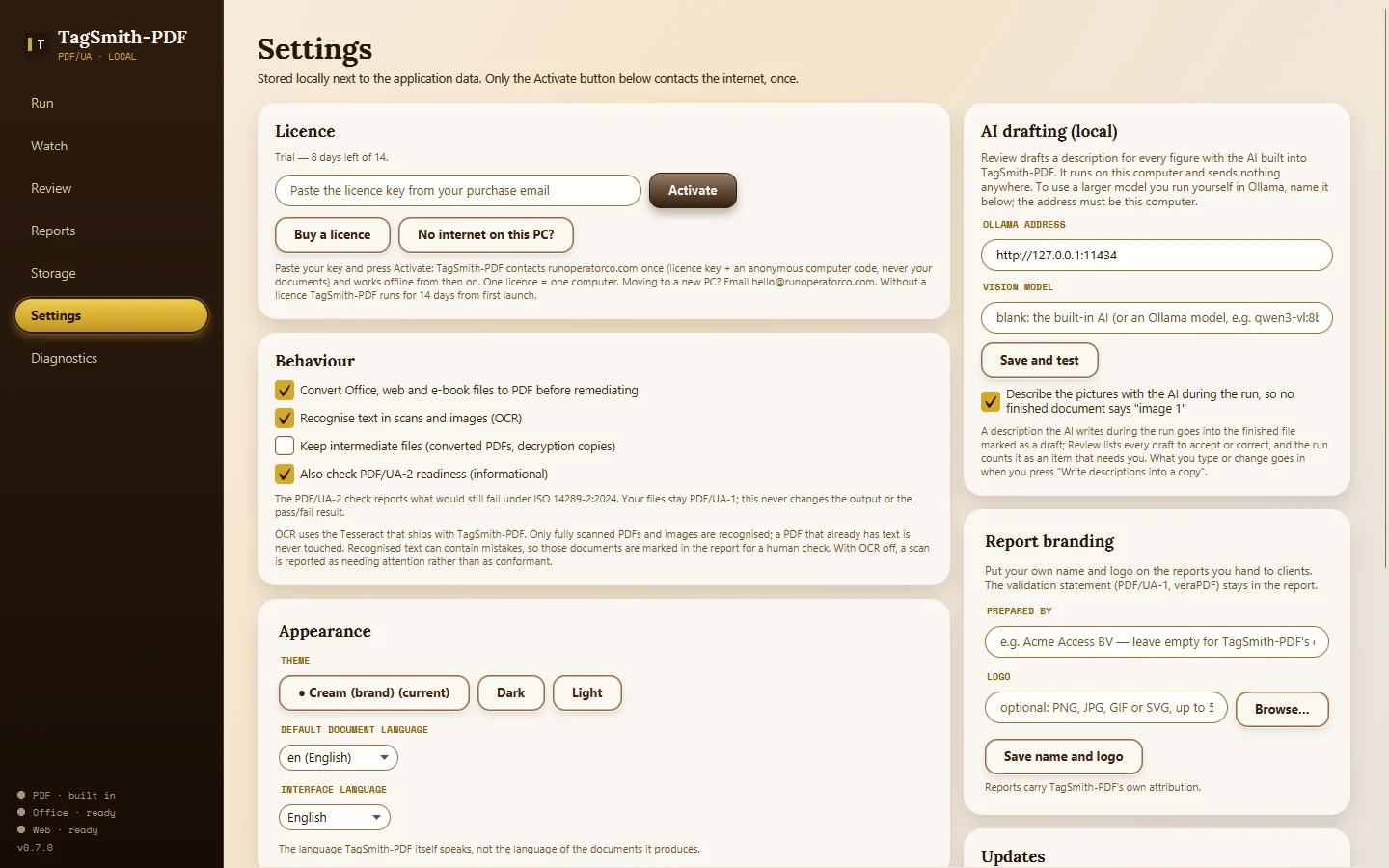
Open the real output
The files that demo batch produced, unedited
Open them the way your auditor would. Demo batch: 7 of 7 fully PDF/UA-1 conformant, 65 fixes applied, failed checks 2,556 → 0. The built-in AI wrote 29 picture descriptions during the run; they stay drafts until a person accepts them in Review.
Why one-time
The closest professional tools are sold by the year.
| Tool (one user) | Price | Every year? |
|---|---|---|
| PDFix Desktop Pro | €350 per user per year | Yes |
| PDFix Desktop Enterprise | €1,000 per user per year | Yes |
| TagSmith-PDF | €149 once | No — one licence, one PC |
PDFix list prices read from pdfix.net/pricing/desktop on 13 October 2026. axesPDF (axes4) is also sold as a subscription. Their feature sets differ from TagSmith-PDF’s; this compares how you pay, not repair quality.
Trust & transparency
Private by design, paid once.
Zero cloud uploads
TagSmith-PDF runs entirely on your PC and your documents are never uploaded — including when the AI drafts a description, which happens on your own machine. The app goes online only when you press a button: Activate (once, sending only the licence key and an anonymous computer code) or Check for updates (reads a version number; nothing downloads by itself). No background checks, no telemetry, no account.
Your originals are never modified; results go to a separate folder.
Honest limits
What TagSmith-PDF does not do
- It does not certify documents or give legal advice. Results are machine-verified and reproducible; the Accessibility Conformance Report is machine-generated evidence and marks what only a person can judge.
- The built-in AI is small enough to run offline on any PC, and it can be wrong. Its descriptions are drafts for a person to check, and the app says so until someone does.
- Software cannot judge whether an image description says what the picture is for, whether the reading order is logical, or colour contrast. Review, the screen-reader preview and the human review checklist are there for that.
- A font that is neither embedded in the PDF nor installed on your PC cannot be embedded by anyone. TagSmith-PDF reports it with the fix (re-export with fonts embedded) instead of hiding it.
- Office, web and Markdown conversion use free tools you may already have (LibreOffice, Edge or Chrome, Pandoc); the app names any that are missing. PDFs, images, OCR and the AI work out of the box.
- Windows 10/11 (64-bit) only, about 2 GB disk space, 8 GB RAM recommended. The installer is not code-signed yet.
What you get
One purchase, one licence key
- TagSmith-PDF 0.7.0 installer for Windows (about 1.7 GB, the built-in AI included; installs without admin rights)
- Quick Start guide (PDF): install, activate, first batch, review, reports, watched folders, FAQ
- Bonus: Human review checklist (PDF) — the 10-minute check for what software cannot judge
- Your personal licence key (on the receipt and by email)
Activation takes 10 seconds: install, open Settings → Licence, paste the key, press Activate. €149 one-time, one licence = one computer, no subscription, no account. A PC without internet? Press “No internet on this PC?” in the app and activate from any other device at runoperatorco.com/activate.html. Moving to a new PC? Email hello@runoperatorco.com and we move it.
Want to read the notes behind the build? Workbench blog → · What’s next → · Have a question or want to leave a review? Reviews and questions →
Community
Reviews and questions
Reviews come only from people who bought TagSmith-PDF; the licence key is checked with Gumroad. Questions are open to anyone with a free account, and the maker answers here. A new person's first post is read by a human before it appears.
Loading reviews and questions. This needs JavaScript; without it, write to hello@runoperatorco.com.